
Caller ID and Caller ID Name, also known as CNAM, is a bit of a complex topic. This is mainly because of the massive amount of new capabilities available in a modern phone networks that has been built up over the past decades. Understanding how it works and what features are available are important to every business.
- Caller ID is the phone number that is presented on outbound calls. This is very straight forward and the account admin has a high level of control on what is displayed for the phone number on outbound calls. Caller ID can be set at 2 different points on the account. The first being the Default Caller ID for the account and the second being the user level caller ID. The Default Caller ID is inherited by all users who don't have a set caller ID value. In the event a user has a set Caller ID value that takes precedent over the Defaulter Caller ID for the account. The Default Caller ID for the account is what is also presented as the Main Number on the dashboard. Note that only an account admin has access to these settings.
- To change the Default Caller ID for the account follow these steps
- Log in to the portal https://portal.ringrx.com/
- Click the initials in the top right corner
- Click on settings
- Click Edit on the right
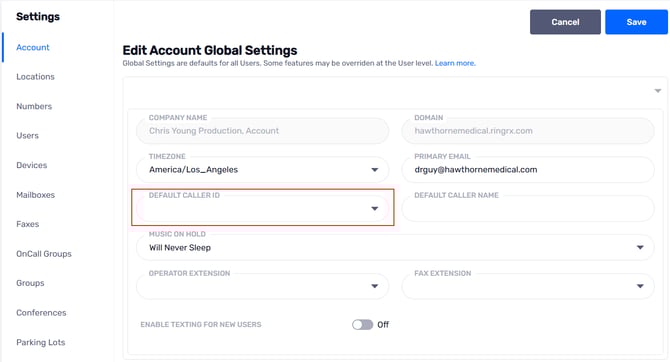
- In the Default Caller ID drop down select the phone number that you want to set
- Note that the numbers in this drop down are based on what is currently on your account
- Click Save
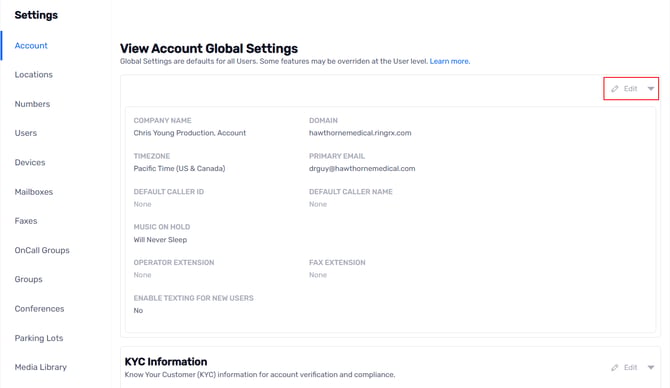
- To change the Default Caller ID for the account follow these steps
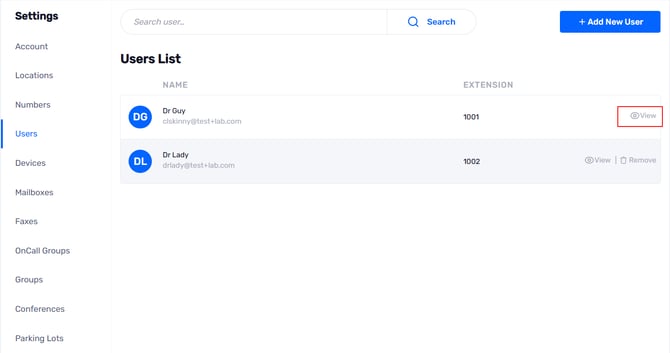
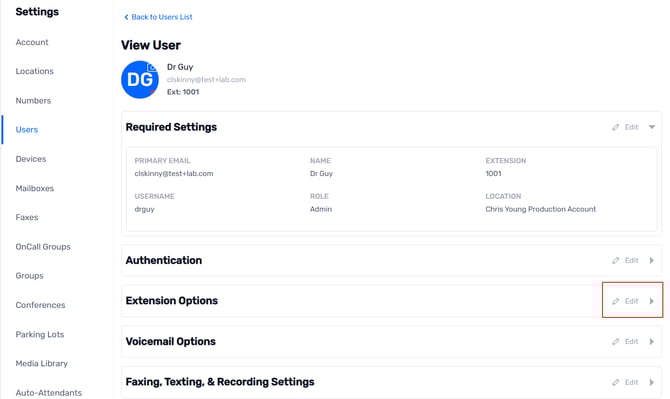
- To change a Users Caller ID follow these steps
- Log in to the portal https://portal.ringrx.com/
- Click the initials in the top right corner
- Click on settings
- Click on Users
- Locate the User you want to modify
- Click View on the right
- Click Edit to the right of extension options
- In the Caller ID drop down select the phone number that you want to set
- Note that the numbers in this drop down are based on what is currently on your account
- Click Save
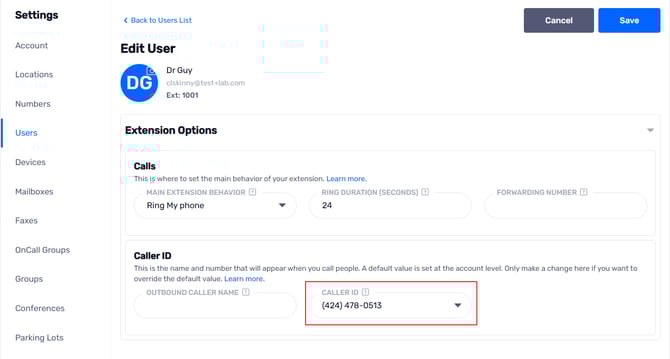
Note that the above Caller ID changes are immediate, once you hit save the new changes will be applied to the very next calls
- Caller ID Name or CNAM is the name info that is displayed when you call someone. This is the more complex and nuanced part of caller ID as most people think of it.
-
- Caller ID Name can be set at the phone number level. This is set with a number “carrier” – a carrier is a large wholesale phone company that manages traffic in the Public Service Telephone Network. Industry standard sets the Caller ID Name, or CNAM, at only 15 characters. This update can take 5-10 business days to be propagated across all the impacted databases.
- The phone company of the person you are calling can elect to display your CNAM or not display it. Also, some phone companies have a limitation that prevents them from displaying it. As a result, some of the people you call will be using phone companies that may NOT display CNAM. So be prepared for some people to not know who you are when you call. Many cell phone companies do not display CNAM on inbound calls
- RingRx lets you add outbound customized CNAM to your service. However, whether this displays depends entirely on the phone company of the person you are calling. Just be prepared for your CNAM to appear one way or not at all. It is common for cellphone carriers to completely ignore this information
The best practice is to set CNAM of 15 characters or less at the carrier level (we do this on your behalf at your request) and also to set any CNAM within our service parameters. There are several places to set CNAM – at the company level, user level, phone number level, etc. In general, a single CNAM at the company level is usually sufficient for most companies. In our experience the info that we set at the carrier level gets propagated across to the databases that land lines and other VoIP carriers use but it is unlikely that it will get to the databases that the cell carriers reference. For that we recommend that you use https://freecallerregistry.com/ which is a free service geared towards you the consumer. They publish the CNAM out to the various databases that some of the cell companies use and they do not have the same character restriction that is seen when updating with the carrier.
All CNAM settings are done at your request. We make no assumptions about the name that should appear when you are calling out. If you would like to set or change your CNAM, please submit a support request to support@ringrx.com